Square Revenue Rollup Options Explained
Bookkeep’s Square accounting automation lets merchants control how Square sales are summarized and posted to accounting systems such as QuickBooks or Xero. Choosing the right Square revenue rollup method improves reporting accuracy, especially when selling across multiple order channels.
This article explains the three Square revenue rollup options available in Bookkeep, including the newly added Order Source rollup.
Supported Square Revenue Rollup Methods
Bookkeep currently supports the following Square revenue rollup options:
-
Product Category
-
Item Name
-
Order Source (new)
Each option determines how Square revenue is grouped when Bookkeep generates journal entries in your accounting system.
Product Category Rollup
When revenue is rolled up by Product Category:
-
Sales are grouped based on the category assigned to each Square item.
-
All items within the same category are summarized into a single revenue line.
Best for:
Square sellers who want simplified accounting with high-level revenue visibility by category (e.g., Food, Beverage, Retail).
Item Name Rollup
When using Item Name rollups:
-
Each unique Square item posts as a separate revenue line.
-
Journal entries contain more detail and higher line counts.
-
Item-level revenue is preserved in QuickBooks or Xero.
Best for:
Merchants who need granular item-level revenue reporting for margins, audits, or operational analysis.
Order Source Rollup (New)
The Order Source rollup groups revenue based on where the order originated rather than the product sold.
Common Square order sources include:
-
Square POS
-
Square Online
-
DoorDash
-
Uber Eats
-
Other Square-integrated delivery and ordering platforms
When enabled:
-
Revenue is summarized by order source.
-
All items sold through the same channel are grouped together.
-
Journal entries clearly show revenue by sales channel.
Why it matters:
Many Square merchants operate across multiple sales channels, and performance, fees, and payout timing often vary by source. Rolling up revenue by order source makes it easier to:
-
Analyze delivery vs. POS vs. online performance.
-
Align accounting with operational reporting.
Best for:
Restaurants and multi-channel Square sellers using delivery apps like DoorDash and Uber Eats.
Changing the Default Posting Method
The default posting method for Square is Product Category. To change it to Item Name or Order Source:
-
Go to the Connections page and open the My Apps tab.
-
Locate your Square connection and expand the setup panel.
-
Click Configure to open the Sales Rollup Method modal.
-
Select your preferred rollup: Product Category (default), Item Name, or Order Source.
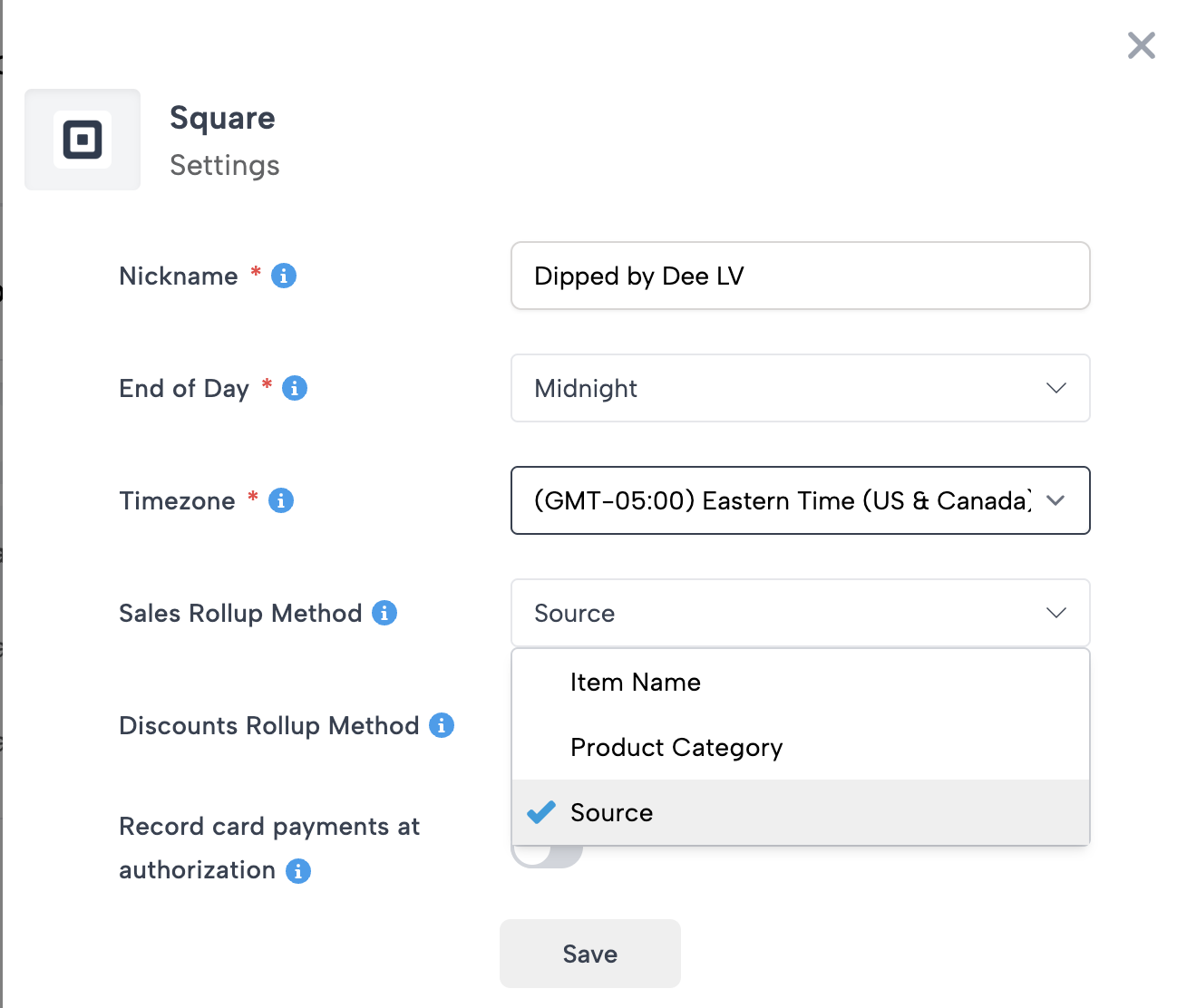
This selection determines the subcategories used for gross sales, discounts, and refunds in your journal entries.
Example Journal Entries
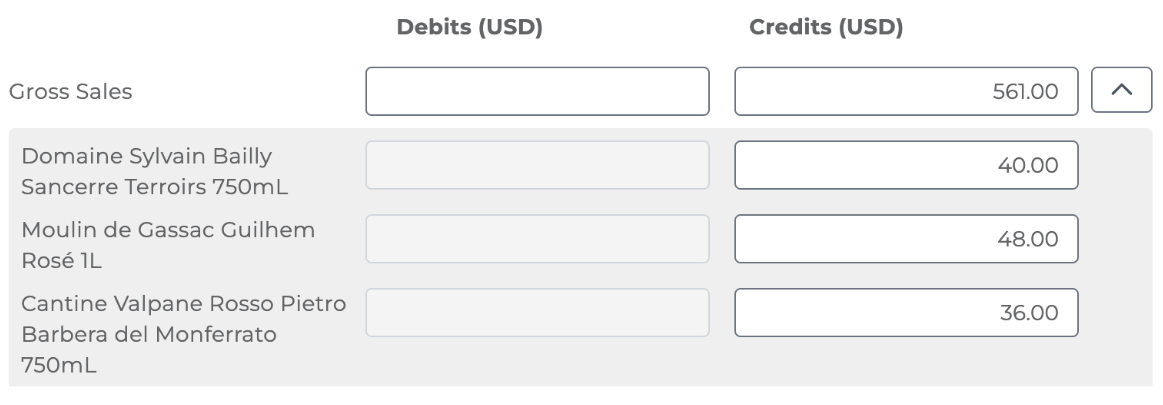
Item Name Rollup:
Example shows how each unique item posts separately.
Product Category Rollup:
Example shows sales grouped by category. Uncategorized items appear if no category is assigned.

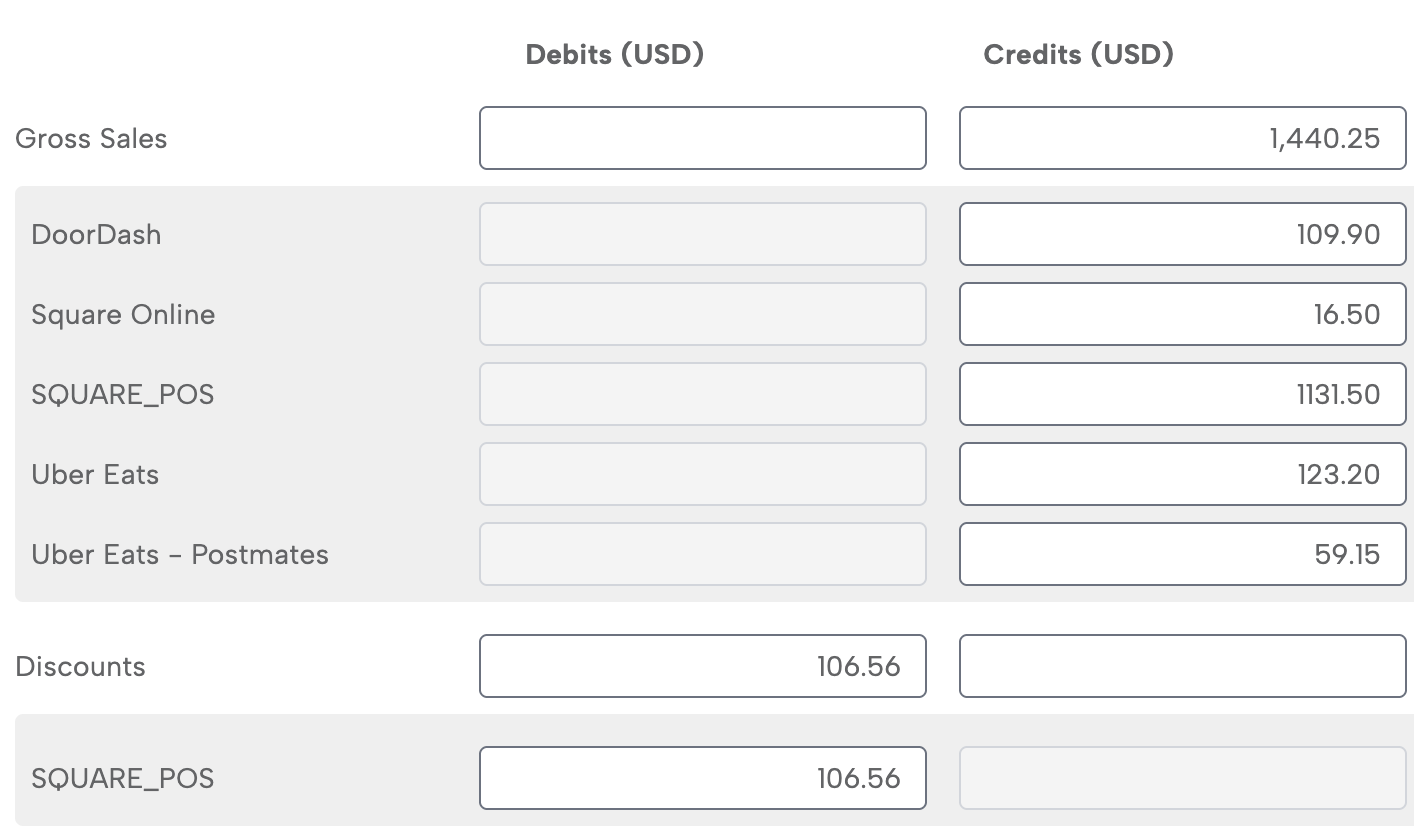
Order Source Rollup:
Example shows revenue grouped by order source, e.g., POS, online, or delivery platform.
Why Use Bookkeep for Square Accounting Automation
Regardless of the rollup method selected, Bookkeep ensures:
-
Accurate Square revenue recognition.
-
Proper handling of Square fees, tips, and taxes.
-
Clean, balanced journal entries in your accounting system.
Bookkeep is built specifically to handle the accounting complexity of Square and other commerce platforms.
Need help choosing a Square revenue rollup method?
Contact our team at support@bookkeep.com for guidance on the best configuration for your business.