Toast Revenue Rollup Methods In Bookkeep
Overview
When connecting Toast with Bookkeep, you can choose how your revenue is categorized and summarized in your accounting entries. Selecting the right revenue rollup method helps align your daily sales entries with how your business reports and analyzes income.
Bookkeep now supports nine revenue rollup options for Toast:
-
Item Name
-
Menu Category
-
Order Source
-
Order Revenue Center
-
Restaurant Service
-
Menu Category + Revenue Center + Restaurant Service (Multidimensional Rollup)
-
Menu Category + Order Source (Multidimensional Rollup)
-
Menu Category + Dining Option (Multidimensional Rollup)
-
Menu Category + Menu Group (Multidimensional Rollup)
You can choose the method that best reflects how you manage and report revenue in your accounting platform.
Alongside the revenue rollup, Toast connections have two related settings that control how discounts and tips are grouped. These are covered in Discounts Rollup Method below and in Toast Tips Rollup Methods.
Why Revenue Rollup Matters
Revenue rollup determines how individual sales transactions are grouped in your accounting entries. This affects:
-
Financial reporting clarity
-
Profitability analysis
-
Sales channel or location tracking
Different businesses may prefer different rollup structures depending on reporting needs, POS configuration, and accounting workflow.
Available Rollup Options
1. Revenue by Item Name
Bookkeep groups sales based on the individual item names sold in Toast.
This method provides the most granular view of revenue by item.
Use this option when:
-
You need detailed reporting at the product/item level
-
You want to track best‑selling items in accounting
2. Revenue by Menu Category
Bookkeep groups revenue based on the Sales Category assigned to each item in Toast (e.g., “Food”, “Liquor”, “NA Beverage”).
Use this option when:
-
You want category‑level insights rather than item‑level detail
-
Your accounting team tracks revenue by broad product families
You simplify reporting while retaining meaningful segmentation
3. Revenue by Order Source
Bookkeep groups revenue by Order Source, which is the channel through which the order originated. Examples include:
-
In Store
-
Online
-
Invoice
-
Catering
-
DoorDash
-
UberEats
Use this option when:
-
You want to compare revenue across sales channels
-
You analyze performance of online vs in‑store ordering
-
You reconcile Toast revenue with external order partners
4. Revenue by Order Revenue Center
Bookkeep groups revenue by Order Revenue Center, which in Toast represents the service areas that generate sales. Revenue centers help track sales generated by one or more service areas, tables, and devices, and they are fully customizable by the restaurant (e.g., “Bar”, “Kitchen”, “Patio”).
Use this option when:
-
Your business operates multiple revenue centers
-
You want to analyze profitability by service area or operational unit
-
You want your accounting structure to align with your Toast revenue center configuration
5. Revenue by Restaurant Service
Bookkeep groups revenue by Restaurant Service, a configurable dimension that represents different service periods or dayparts within your operation. Common setups include:
-
Breakfast
-
Lunch
-
Dinner
-
Late Night / Happy Hour
This option allows you to align revenue reporting with how your restaurant operates throughout the day.
Use this option when:
-
You want to analyze performance by daypart or service period
-
Your operations and staffing are structured around meal services
-
You track profitability across breakfast, lunch, dinner, or other service windows
6. Revenue by Menu Category + Revenue Center + Restaurant Service (Multidimensional Rollup)
This advanced option groups revenue using a combined structure of Menu Category, Restaurant Service, and Revenue Center, creating a multi-layered view of performance.
Instead of aggregating revenue into a single dimension, Bookkeep produces a structured, multi-axis rollup that preserves:
-
What was sold (Menu Category)
-
When it was sold (Restaurant Service)
-
Where it was sold (Revenue Center)
Use when:
-
You need deeper dimensional reporting across operations
-
You want accounting data that maps cleanly into multiple dimensions in your ERP or accounting platform
-
You analyze profitability across product mix, daypart, and service area simultaneously
-
You require more granular slicing without losing hierarchy or context
7. Revenue by Menu Category + Order Source (Multidimensional Rollup)
This option groups revenue using a combined structure of Menu Category and Order Source, creating a multidimensional view of sales performance.
Instead of aggregating revenue into a single dimension, Bookkeep produces a structured rollup that preserves:
-
What was sold (Menu Category)
-
How the order was placed (Order Source)
This allows businesses to separate revenue by both product mix and sales channel within the same summarized accounting entry.
Examples include:
-
Food — POS
-
Food — DoorDash
-
Beer — Uber Eats
-
Cocktails — Online Ordering
Use when:
-
You want visibility into product performance across ordering channels
-
You analyze profitability between in-store, online, and third-party delivery sales
-
You want cleaner reporting for delivery platform analysis without requiring item-level detail
-
You operate across multiple Toast ordering channels and want more operational context in your accounting system
8. Revenue by Menu Category + Dining Option (Multidimensional Rollup)
This option groups revenue using a combined structure of Menu Category and Dining Option, the Toast dimension that describes how the guest received the order.
Dining Option is configured by the restaurant, and is a distinct dimension from Order Source: Order Source describes where the order came from, while Dining Option describes how it was fulfilled. Common Dining Options include:
-
Dine In
-
Take Out
-
Delivery
-
Curbside
-
Catering
Because both are configurable, a single restaurant may use fine-grained Dining Options such as "Lunchbox - Takeout" or "Catering Cartwheel" alongside the standard ones.
Bookkeep produces a structured rollup that preserves:
-
What was sold (Menu Category)
-
How it was fulfilled (Dining Option)
Examples include:
-
Food — Dine In
-
Food — Uber Eats - Delivery
-
NA Beverage — EzCater
-
Food — Lunchbox - Takeout
Use when:
-
Your Toast reporting is organized by Dining Option and you want your accounting entries to match
-
You analyze profitability between dine-in and off-premise fulfillment
-
You reconcile against Toast's Sales by Menu Category → Dining Options reporting
-
Your Dining Options carry more operational meaning than your Order Sources
9. Revenue by Menu Category + Menu Group (Multidimensional Rollup)
This option groups revenue using a combined structure of Menu Category and Menu Group, the sections your Toast menu is organized into, such as "Starters", "Entrees", and "Desserts".
Menu Categories are usually broad (Food, Liquor, NA Beverage), while Menu Groups follow the layout of your menu. Combining the two splits a broad category like Food into the sections of your menu without going all the way down to individual items.
Bookkeep produces a structured rollup that preserves:
-
What kind of sale it was (Menu Category)
-
Where the item sits on your menu (Menu Group)
Examples include:
-
Food — Starters
-
Food — Entrees
-
Food — Happy Hour
-
Liquor — Happy Hour
Because the Menu Category is kept, a Menu Group that mixes food and drinks, such as a Happy Hour menu, still produces a separate line for each category, so food and beverage revenue can be mapped to different accounts.
An item with no Menu Group is labeled by its Menu Category alone (e.g., Food), and an item with no Sales Category in Toast is labeled by its Menu Group alone. Assigning a Sales Category to every item in Toast keeps each line mapped to the right account.
Use when:
-
Your Toast Sales Categories are broader than your chart of accounts, but item-level detail is more than you need
-
You want revenue to follow the sections of your menu, such as Starters, Entrees, and Desserts
-
You run menus such as Happy Hour that mix food and drinks and need them kept apart in your accounting
Discounts Rollup Method
By default, discounts are grouped using the same dimension as your revenue rollup. For most restaurants this is the desired behavior, since the discount lines then line up with the revenue lines they reduce.
Toast connections also support grouping discounts by Discount Name instead, which matches the Check Discounts figure in Toast's reporting.
| Discounts Rollup Method | Discount subcategories |
|---|---|
| Sales Rollup Method (default) | Dine In, Take Out — follows the revenue rollup dimension |
| Discount Name | Employee Meal - 100%, Night Shift — the discount name from Toast |
Use Discount Name when:
-
You reconcile the Discounts line against Toast's Check Discounts report
-
You need to see which promotions or comps drove the discount total
-
You map different discount programs to different GL accounts
Switching this setting changes only how the discount total is labeled and grouped — the total itself does not change.
How it Works in Practice
Once a rollup method is selected in Bookkeep:
-
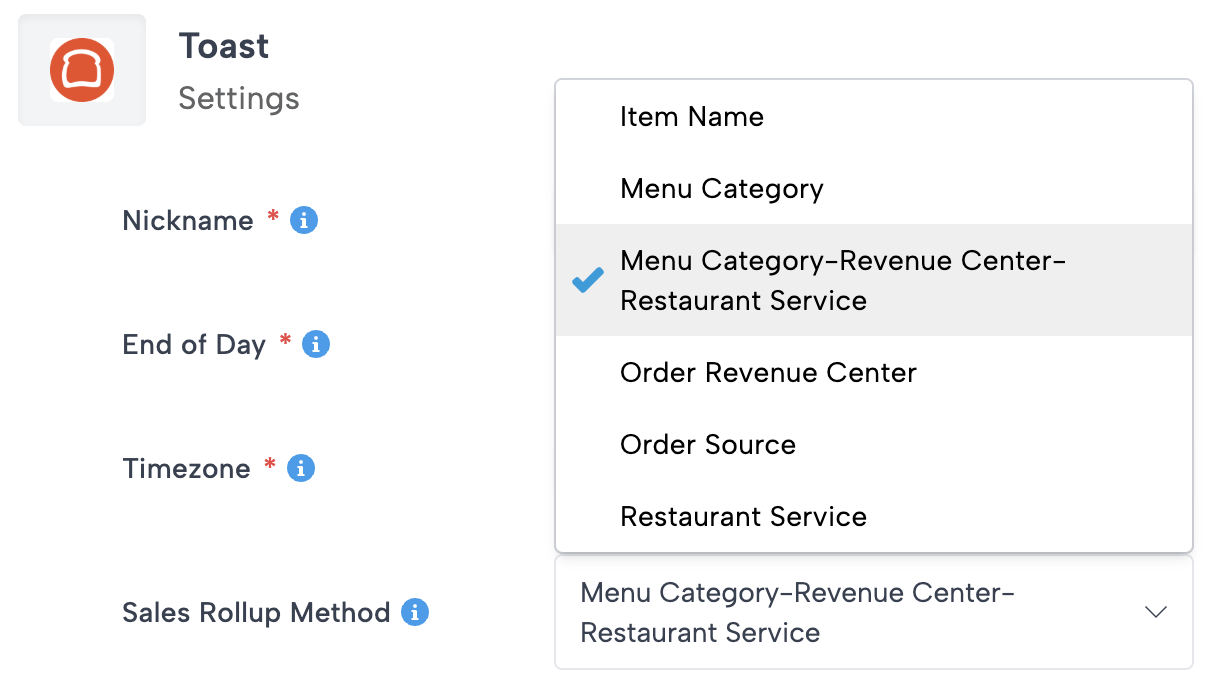
Ongoing daily sales data from Toast is fetched and reported using the selected rollup method. If the rollup method is changed, you will need to refresh any relevant days to have them posted using the updated rollup configuration. This rollup method can be configured in the Toast Settings located under the My Apps tab within the Connections view:
-
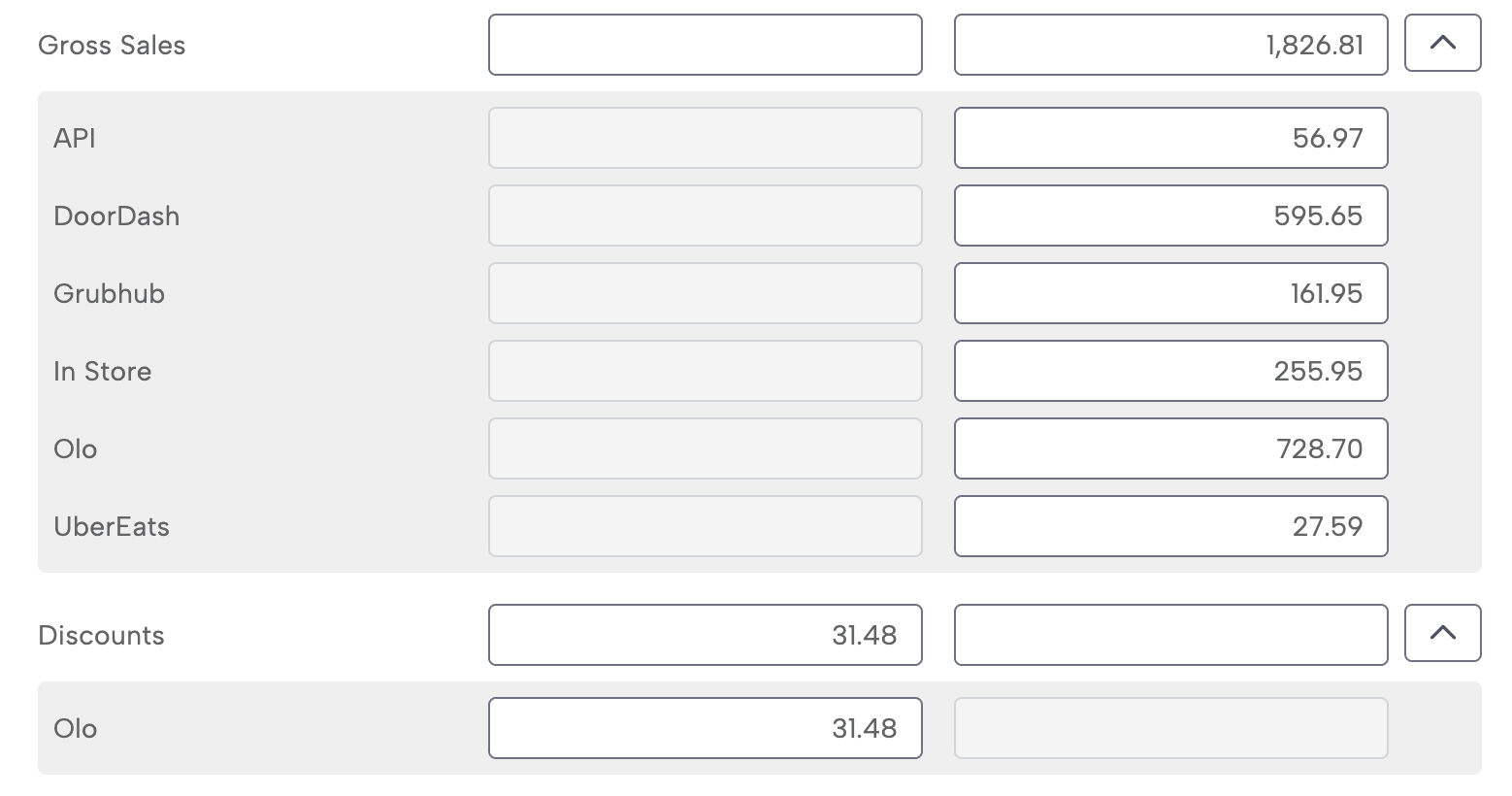
Revenue and refunds are grouped according to the selected rollup method. Discounts follow the same dimension unless the Discounts Rollup Method is set to Discount Name, and tips follow the Tips Rollup Method described in Toast Tips Rollup Methods.
-
A summarized journal entry is posted to your accounting platform with revenue grouped by the selected dimension.
This ensures your revenue entries align with how your business tracks and reports performance.
Benefits of Revenue Rollup in Bookkeep
-
Accurate financial reporting aligned with business structure
-
Custom segmentation based on item, category, source, or center
-
Scalable automation for daily revenue posting
-
Improved visibility into performance drivers across the business
By selecting the appropriate rollup method, you ensure your accounting entries reflect how your business actually earns and operates revenue.