Amazon Payment Settlement Reconciliation Report
Every time Amazon pays out a settlement, Bookkeep reconciles it against Amazon. The report pulls the exact balances Amazon holds for you after the payout, puts them next to the same accounts in QuickBooks, and shows the difference. You can step back through past payouts the same way, so it is easy to confirm that every Amazon posting reached your books correctly.
Why a payout is the moment to reconcile
Amazon now books and displays your revenue with a deferred balance: a sale is deferred when it is made and released about a week after delivery, and released sales are paid out in the next settlement. Bookkeep's Deferred and Released Sales Summary books each of these movements daily, so at any moment your books carry three Amazon balances:
- Amazon Balance: sales Amazon has released but not yet paid out. This is what the next payout will bring.
- Deferred Balance: sales Amazon has not released yet.
- Reserve Balance: an account-level reserve, when Amazon holds one.
A payout is the one point where Amazon states these figures exactly. The Amazon Deposit entry Bookkeep posts for the payout records them, and this report compares them with your accounting platform.
Where to find the report
Reports → Amazon → Amazon Payment Settlement Reconciliation
The Amazon section of the Reports page appears when the entity has an Amazon connection. Choose the Connection (one per marketplace), then the Payout. Payouts are listed newest first, one per Amazon Deposit entry with a bank deposit.
What the report shows
Payout
The settlement as Bookkeep recorded it: the settlement period, Amazon's Bank Transfer ID, the settlement group, the payout date, and a link to open the journal entry. Four figures follow, each with the account it is mapped to:
| Figure | Meaning |
|---|---|
| Bank Deposit | Cash Amazon transferred to your bank, the amount on the Amazon Payment Statement. |
| Amazon Clearing | Released funds this payout took out of Amazon Balance. Usually equals the bank deposit; it differs when Amazon held a reserve or charged your card. |
| Reserve | Account-level reserve Amazon held back in this settlement instead of paying it out. |
| Card Charge | Charged to your card when a settlement was negative, because fees exceeded sales. |
The Source files links open the attachments on the entry: the settlement rows (orders.csv), the per-day rollup, and the reconciliation report (amazon_reconciliation.csv).
Balances after this payout
The heart of the report. One row per balance, and a totals row:
| Column | Meaning |
|---|---|
| Balance | Amazon Balance, Deferred Balance, Reserve Balance. |
| Mapped account | The account in your accounting platform that the template line for that balance is mapped to. |
| Expected after payout | What Amazon holds for you at the end of the payout date, as recorded on the deposit entry, in the currency Amazon settled in. |
| In QuickBooks | That account's balance on the QuickBooks Balance Sheet as of the payout date, read live when the page opens, in your company's home currency. |
| Difference | Expected minus QuickBooks, in the home currency. Zero means the account reconciles. |
Three details to know when reading it:
-
Stores that settle in another currency are compared in your home currency. Column headings carry the currency codes. The expected balances are shown in the settlement currency and restated in the home currency at the rate the deposit itself was booked at: Amazon's own payout rate when Amazon converted the payout for you (the deposit entry records it), otherwise the rate Bookkeep used when it posted the entry, otherwise the market rate for the payout date. The report names which one it used. Your QuickBooks Deferred Balance is a sum of daily entries, each converted at its own day's rate, so after every entry has posted a small remainder can still show; that remainder is foreign-exchange revaluation, not a missing entry, and it is what an adjusting entry at period end should book.
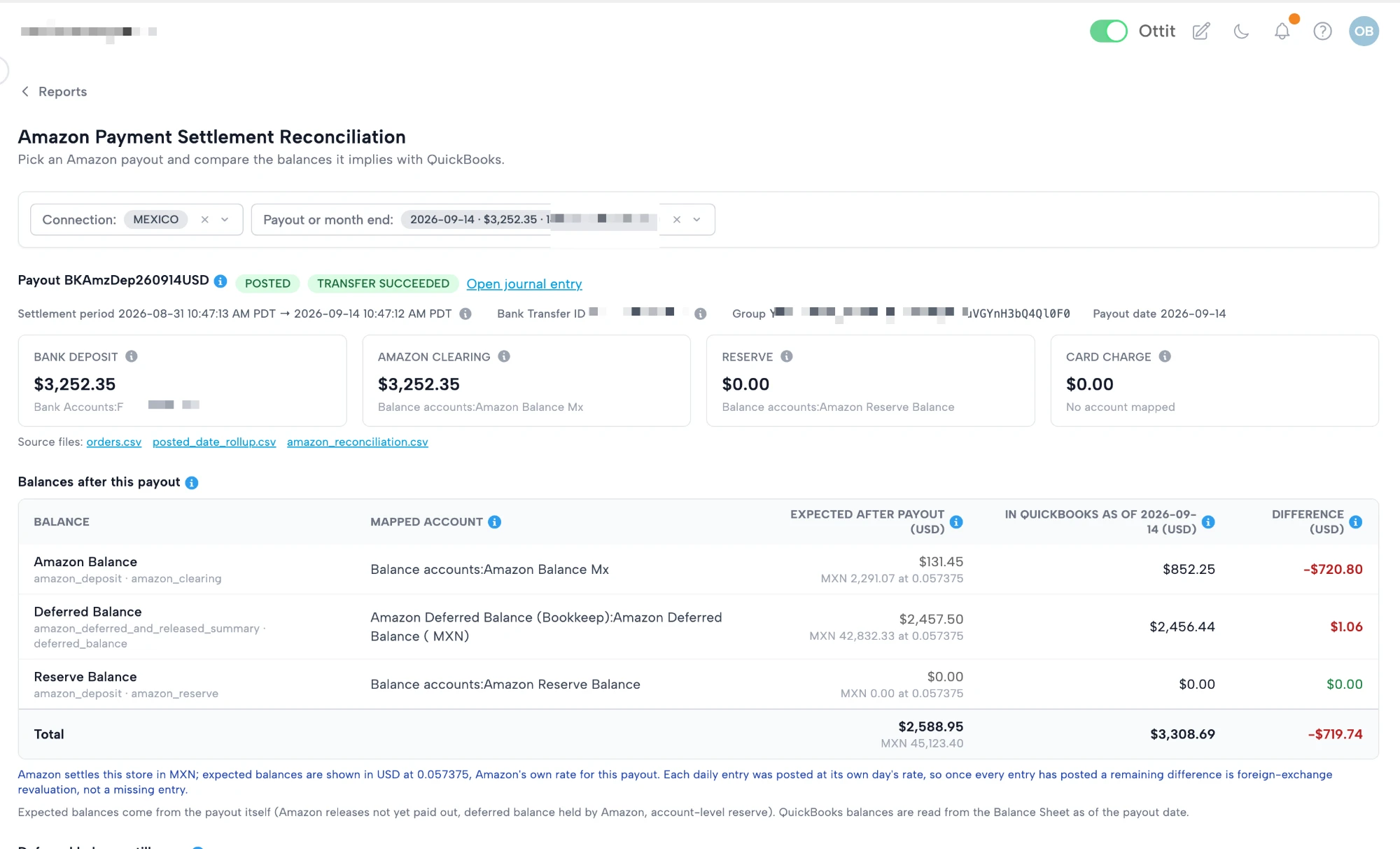
A store settling in MXN with books in USD. The Deferred Balance differs by $1.06 with every entry posted: that is the foreign-exchange revaluation described above.
-
Lines mapped to the same account are compared as one row. If Amazon Balance and Deferred Balance both post to one account, their expected balances are summed against that account's single balance, because that is the only figure the account can be compared to.
-
An account missing from the Balance Sheet is shown as not on the balance sheet and counts as 0.00 in the total. That is what QuickBooks means by leaving it out. A row that cannot be read at all, because a line is unmapped or the books are not in QuickBooks, is left out and the total is marked partial rather than presented as complete.
Deferred balance still open
The Deferred Balance broken down by the day the sales were made, with the number of deferred transactions on each day. It is read from the payout's amazon_reconciliation.csv, and its total is the Deferred Balance in the table above, so you can see what the balance is made of and how old it is. Amazon releases a sale about a week after delivery, so most of it should be recent.
Released from
The daily releases this payout paid out, one row per day, newest first. The total equals Amazon Clearing. A day can be split across two payouts when a settlement closes in the middle of it, in which case the row carries the part that belongs to this payout.
How to reconcile with it
- Open the latest payout. If every Difference is zero, the three accounts reconcile as of that payout date and you are done.
- If a difference shows, open the journal entry and the payout's
amazon_reconciliation.csv. Its DAILY ENTRIES section tells you whether every daily sales entry in the period posted and agrees with the payout, and names any day that did not. - Check for postings to those accounts that did not come from Bookkeep: a manual journal entry, a bank feed rule, or an entry posted to the wrong account.
- Step back through earlier payouts until the difference disappears. The first payout that shows it brackets the period where the books and Amazon parted ways.
Requirements and limits
- Live balances need QuickBooks Online. On Xero or another platform the expected balances still show and you compare them to your books by hand; the QuickBooks column reports that it cannot be read.
- The Deferred and Released Sales Summary must be mapped on the connection. The Deferred Balance row reads the account mapped on that template.
- Payouts posted before Bookkeep recorded balances show the payout details but no expected balances. An administrator can use Refresh entry to rebuild the payout from source, after which the balances and the reconciliation file are there.
- Balances are as of the payout date. QuickBooks is read as of that date, so entries posted later for earlier dates are included, and today's activity is not.